X

Partner Login

Enter your username and password here on order to log in on the partner portal:

No registered partner yet?

Register now

Why Use an Industrial Managed PoE Switch?

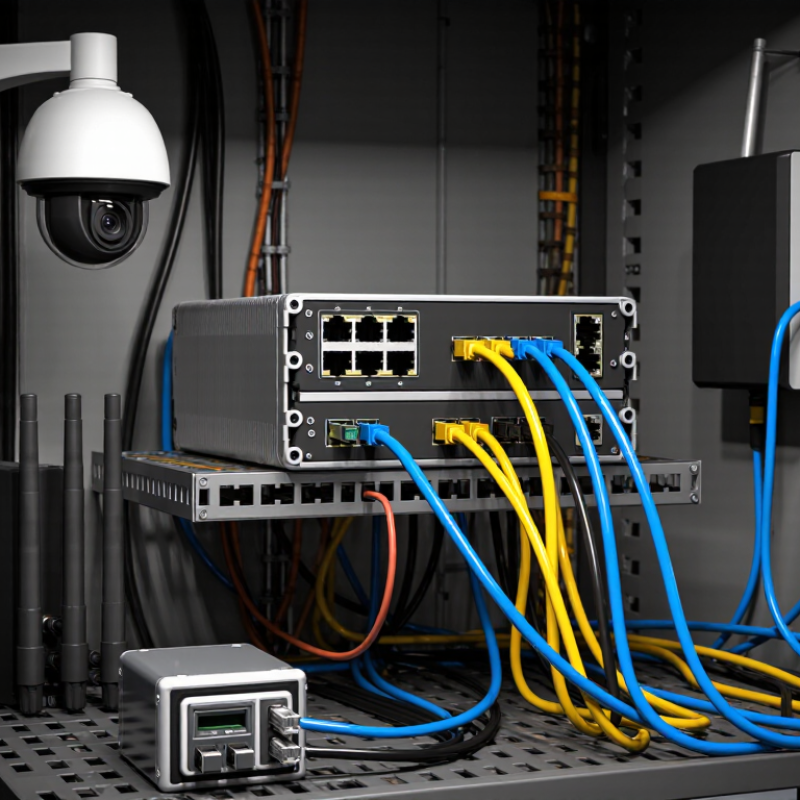
An Industrial Managed Poe Switch does more than send power through an Ethernet cable. It helps teams monitor, configure, and troubleshoot devices across demanding sites. Think of a factory cabinet with vibration, heat, and cables running to cameras, sensors, and wireless access points. When one device drops offline, clear port status and event logs can make the fault easier to locate.

Computer-networking author Andrew S. Tanenbaum is often credited with the observation, “The nice thing about standards is that there are so many to choose from.” It is a useful reminder for industrial network design. Buyers should check compatibility, power budgets, management features, and environmental ratings—not just the port count. A switch may support VLANs, traffic prioritization, and remote monitoring, yet still be the wrong fit if its temperature range or PoE capacity falls short.

Details matter. A managed switch can help isolate traffic between control devices and office systems, while redundant power inputs may support continuity when a supply fails. But the word “managed” is not a guarantee of reliability. Configuration quality, installation, and maintenance still matter. I would not treat every feature as essential. Sometimes, a simpler network is easier to maintain. This guide examines where an Industrial managed poe switch adds practical value, what to verify before purchase, and where expectations should remain realistic.
Why Use an Industrial Managed PoE Switch?

What Defines an Industrial Managed PoE Switch

An industrial managed PoE switch combines Ethernet connectivity, power delivery, and remote network control in one rugged device. “Managed” means technicians can configure VLANs, prioritize traffic, monitor ports, and diagnose faults remotely. “PoE” means power and data travel over the same cable. IEEE 802.3bt allows up to 90 watts from the power-sourcing equipment per port, though the device receives less after cable losses. That difference matters when powering cameras, wireless access points, or sensors.

Industrial models are built for harsher conditions than typical office switches. Look for a specified operating-temperature range, resistance to vibration, DIN-rail mounting, and redundant power inputs. Those features help when a cabinet sits near a production line, where heat and electrical noise are routine. The exact limits vary by model, so check the datasheet against the site conditions. A rugged housing alone proves little.

Management features should match the network’s real needs. Ring recovery protocols can restore links after a cable break; QoS can prioritize time-sensitive traffic. The Industrial Ethernet Market report from Grand View Research valued the global market at USD 10.6 billion in 2023, reflecting the wider adoption of connected industrial systems. Market growth does not guarantee reliability, though. Configuration mistakes still happen, and a powerful switch can make them harder to spot. A clear port map helps.

How It Delivers Power and Network Connectivity

Why Use an Industrial Managed PoE Switch?

An industrial managed PoE switch sends data and electrical power through the same Ethernet cable. A connected camera, access point, or sensor can receive both from one port. No separate power adapter is needed at the device. This can simplify wiring along a factory wall or inside a roadside cabinet.

The switch acts as the power source, while compatible devices request power through standardized negotiation. It then supplies power within its available budget. Check the switch’s total PoE capacity, port limits, and the devices’ requirements before installation. A busy cabinet can run out of power sooner than expected.

Cable length matters, too. Ethernet links generally support up to 100 meters, but poor-quality cable or harsh conditions can still cause trouble. Shorter runs are often more dependable. Small detail. A managed switch also handles network traffic: VLANs can separate cameras from control equipment, while monitoring tools can report port status or power use. In practice, those settings need careful planning. Too many rules can make troubleshooting harder, not easier. Choose industrial temperature ratings and redundant power inputs only when the site actually needs them.

Why Use an Industrial Managed PoE Switch? - How It Delivers Power and Network Connectivity

Feature How It Works Typical Standards or Values Practical Benefit
Power and data over one cable Power over Ethernet (PoE) sends electrical power and Ethernet data to a compatible device through the same twisted-pair cable. Common applications use IEEE 802.3af, 802.3at, or 802.3bt PoE. Reduces separate power cabling and can simplify installation for cameras, wireless access points, and other network devices.
PoE power levels The switch supplies power; the connected device negotiates and uses the amount it requires within the supported standard and available budget. 802.3af: up to 15.4 W at the source; 802.3at: up to 30 W; 802.3bt: up to 60 W or 90 W, depending on type. Usable device power is lower because of cable losses. Helps match switch capacity to device needs, from basic sensors and phones to higher-power access points and cameras.
Total PoE budget The switch shares its available PoE capacity among powered ports. The usable total depends on the power supply, model, and operating conditions. Specified in watts by the manufacturer; the sum of connected-device requirements should remain within the available budget. Supports power planning and helps prevent overload when multiple devices start or operate simultaneously.
Industrial operating environment Industrial models are designed for deployment in cabinets and equipment areas that may experience wider temperature ranges, vibration, or electrical noise. Operating temperature ranges vary by model; some are specified for approximately −40°C to +75°C. Can provide a better fit for factory floors, roadside cabinets, substations, and other demanding locations than standard office switches.
Managed network controls Configuration tools let administrators monitor ports and control traffic, access, and network behavior. Common functions include VLANs (IEEE 802.1Q), QoS, port monitoring, and SNMP management. Helps separate device traffic, prioritize time-sensitive data, and troubleshoot connectivity remotely.
Network redundancy Supported protocols can provide alternate paths if a link or connection fails. Examples include Rapid Spanning Tree Protocol (RSTP) and Ethernet Ring Protection Switching (ERPS); recovery time depends on protocol, topology, and configuration. Can reduce the impact of a cable or link failure in networks where continued connectivity is important.
Port and device monitoring Management features can report link status, traffic, and PoE status; some models support scheduled or remote port power control. Available monitoring and control features vary by model and software. Makes it easier to identify failed links or devices and may allow a powered device to be restarted remotely.
Flexible network connections Ethernet access ports connect powered devices, while uplink ports connect the switch to the wider network. Port speeds and copper or fiber uplink options vary by model; gigabit Ethernet is common for uplinks. Supports local device connections and longer-distance or higher-bandwidth links where the network design requires them.
Power-input resilience Some industrial switches accept redundant DC power inputs so a second source can help maintain operation if the primary input fails. Input voltage range and redundancy behavior are model-specific and should be checked against the power supply design. Can improve power availability when the installation provides independent power sources.
Values and features are general reference points, not guarantees for every switch. Confirm the device’s PoE standard, total power budget, temperature rating, and supported management protocols in its technical specifications.

Key Management and Reliability Features

Why Use an Industrial Managed PoE Switch?
Key Management and Reliability Features

An industrial managed PoE switch gives network teams control over both data traffic and device power. In a cabinet beside a production line, port status can help identify a disconnected camera without checking every cable. VLAN settings separate camera traffic from control devices, while quality-of-service rules can prioritize time-sensitive data. That visibility matters. Monitoring tools can report link changes, power use, and faults, making it easier to investigate problems before a brief outage disrupts an entire area. Remote configuration is useful too, especially when switches sit in locked or hard-to-reach enclosures.

Reliability depends on the specific model and the network design. Look for features such as redundant power inputs, alarm contacts, and supported ring recovery protocols when downtime is costly. PoE power budgets also deserve attention: adding one more camera can exceed available capacity, even when spare ports remain. Check operating-temperature ratings against the actual cabinet environment, not just the room temperature. Logs and configuration backups help with troubleshooting and replacement. Still, management adds work; a poorly documented VLAN change can cause its own outage. Small details matter, and they are easy to overlook.

Why Use an Industrial Managed PoE Switch?

PoE standards define how much power a switch can deliver per port—an important factor when planning reliable connections for industrial cameras, access points, and other devices.

Values show maximum power supplied by the power sourcing equipment (PSE) per port under each IEEE PoE standard. Actual available power at the powered device is lower due to cable losses.

Benefits for Industrial Network Operations

Industrial network operations depend on stable connections, visible device status, and quick fault isolation. An industrial managed PoE switch carries data and power over one Ethernet cable. It can support cameras, wireless access points, and sensors near production equipment. Fewer power adapters can reduce cabinet clutter and simplify installation. Every cable counts.

Management features help teams understand what is happening across the network. VLANs can separate camera traffic from control or office devices. Port monitoring can reveal link errors, unusual power use, or a disconnected sensor before a small issue spreads. Quality-of-service settings can prioritize time-sensitive traffic, though they cannot compensate for poor network design. Clear logs help during troubleshooting. So does a labeled port map.

Industrial conditions require careful selection. Check operating-temperature ratings, mounting options, PoE budgets, and surge protection against the actual site requirements. A switch may report that a device is connected, but it cannot guarantee the device itself is working correctly. That distinction is easy to miss. Managed PoE can make routine checks more practical, yet teams still need sensible configuration, tested backups, and periodic reviews. The setup may need adjustment as equipment changes.

Common Applications Across Industrial Environments

Why Use an Industrial Managed PoE Switch?
Common Applications Across Industrial Environments

Industrial managed PoE switches connect network devices and supply power through Ethernet, reducing separate power runs. On a factory floor, one switch may serve cameras near conveyors, wireless access points above work cells, and sensors inside control cabinets. Managed features help teams separate traffic, prioritize time-sensitive data, and check port status remotely. Downtime matters. Still, a switch cannot fix poor cabling or weak network design.

In transport facilities, outdoor utility sites, and water-treatment buildings, these switches can connect cameras, access points, and compatible monitoring devices. Their rugged enclosures and temperature ratings may suit dusty cabinets or locations with wide temperature swings. Check the actual operating range, power budget, and protection rating before installation; “industrial” alone does not guarantee a fit. Real sites are rarely tidy, and cable routes can be longer than planned. That detail is easy to miss.

Tips: Map each device’s power draw and cable distance before choosing a switch. Leave room in the PoE budget for startup demand and future additions. Test connections under real operating conditions, not just on a bench. Also consider whether local technicians can use the management interface quickly; a feature-rich setup can be harder to troubleshoot.