Partner Login
Enter your username and password here on order to log in on the partner portal:
No registered partner yet?
Register nowChoosing the right Printer Ink Cartridges can feel like a small purchasing decision. In practice, it affects print quality, equipment reliability, and long-term costs. A cartridge may fit physically but still produce poor results. Compatibility is more than matching a printer’s brand.
Printer-industry consultant David Connett offers a useful reminder: “The cheapest cartridge is not always the cheapest print.” That idea deserves attention. A low-priced cartridge might deliver pale text, uneven photographs, or fewer usable pages. The real cost appears later, beside a clogged nozzle or wasted paper.
A reliable choice begins with your printer’s exact model number. Check the manual, cartridge code, and manufacturer’s compatibility list. Do not rely only on appearance. Some cartridges look identical but use different chips or ink formulas. Laser printers require toner, while inkjet printers use liquid ink. Confusing them is an expensive mistake.
Think about your daily printing habits. Pigment ink usually suits sharp documents and archival work. Dye-based ink often produces brighter photo colors. If you print rarely, inspect the cartridge’s shelf-life guidance. Dried ink can create broken lines across a page. It happens quietly.
Compare page yield, not only the package price. ISO/IEC 24711 figures can provide a more consistent comparison. Still, your results may vary with graphics, font size, and cleaning cycles. Manufacturer data is useful, but it is not a personal guarantee.
OEM, compatible, and remanufactured Printer Ink Cartridges each have advantages. Review warranty terms, return policies, and independent testing. A careful decision may take five extra minutes. That time can prevent a frustrating afternoon. No checklist is perfect, but informed checking remains the safest approach.
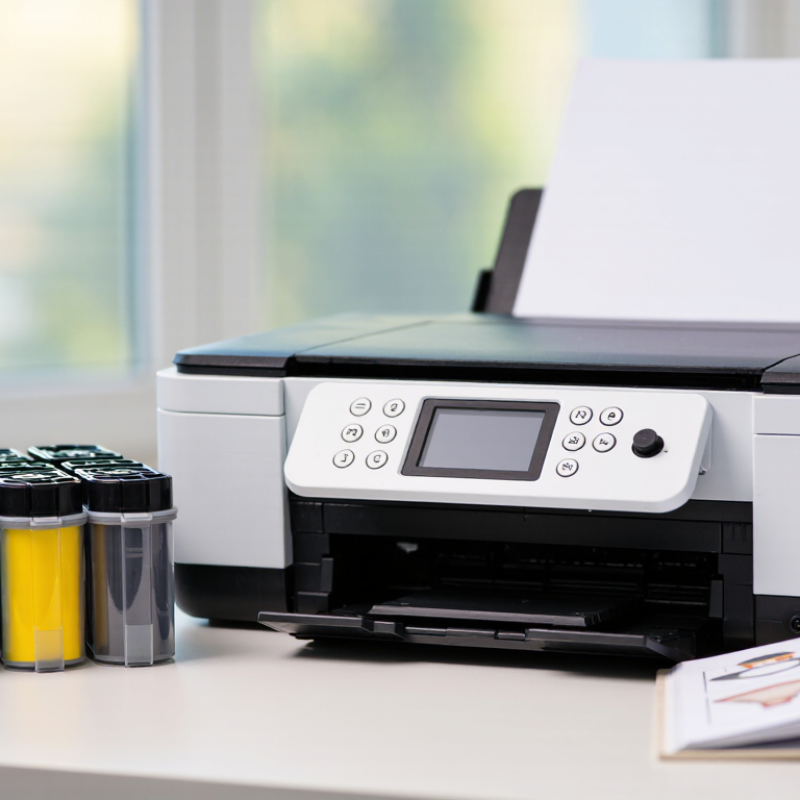
Choosing the right printer ink starts with one precise detail: the exact printer model. Do not rely on appearance or cartridge color. Read the model code on the front, rear label, or control-panel menu. Then check the manual or manufacturer’s support page for the correct cartridge number. A similar-looking cartridge may have different contacts, dimensions, or ink formulation. That small mismatch can cause poor alignment or an error message. Check it twice.
Your cartridge requirements depend on more than physical fit. Record whether the printer uses pigment or dye ink, and note the required color set. Check the page yield if you print invoices, photos, or school materials every week. A higher-yield option can reduce replacements, but only when its rating matches your real workload. Look for sealed packaging, a readable production code, and a clear return policy. I often recheck the cartridge number before ordering; one digit is easy to overlook. Still, page-yield estimates are not promises. Heavy graphics may empty a cartridge sooner than expected. Keep the old cartridge until the new one prints correctly.
Choosing the right printer ink is less about finding the cheapest box. It is about matching performance, usage, and risk. OEM cartridges are produced for a specific printer family. They usually offer predictable color, reliable recognition, and clearly tested page yields. That consistency helps with invoices, photographs, and detailed charts. However, the purchase price can feel surprisingly high, especially for frequent printing.
Compatible cartridges are newly manufactured alternatives designed to fit the same printer models. Their prices are often lower, but quality can vary between suppliers. Check the cartridge number, stated page yield, return policy, and independent test details. A low-cost cartridge is not a bargain if it leaks across a clean page. Read the fine print. Some printers may also display warnings when non-OEM ink is installed, even when printing continues normally.
Remanufactured cartridges use empty cartridges that have been cleaned, refilled, and tested. A dependable remanufacturer should replace worn parts and inspect print quality before shipping. Look for sealed packaging and a practical replacement guarantee. I once viewed price as the main measure of value; that approach ignored downtime and wasted paper. For occasional home printing, a verified compatible cartridge may be sensible. For color-critical work, OEM ink may justify its cost. Remanufactured options can balance economy and waste reduction, but only when testing standards are transparent. Perfect results are not guaranteed. Your printer’s age, storage conditions, and print habits still matter.
Comparing OEM, Compatible, and Remanufactured Cartridge Options
The chart uses normalized industry benchmarks, with OEM cartridges set to 100. Compatible and remanufactured cartridges generally offer lower purchase prices, while page yield can vary by printer model, ink formulation, and cartridge capacity. Actual results should be checked against the cartridge yield specification for your printer.
Choosing printer ink cartridges starts with page yield, not the lowest shelf price. The ISO/IEC 24711 test method measures yield through controlled, repeated pages and standardized coverage. In everyday use, however, dense charts, photos, and frequent cleaning can reduce that number. A cartridge rated for 300 pages may produce far fewer pages in a busy home office. I have made this mistake myself.
Compare cost per page by dividing the cartridge price by its stated yield. Use separate calculations for black and color cartridges. Independent testing guidance from Keypoint Intelligence also treats yield as a laboratory estimate, not a household guarantee. Check whether the figure covers one cartridge or a complete color set. Small details matter.
Ink type affects both durability and appearance. Pigment-based ink usually resists water and fading better, while dye-based ink often produces vivid colors on suitable photo paper. Wilhelm Imaging Research reports that light exposure, humidity, paper quality, and air pollutants can change print permanence results. Print quality specifications should therefore include resolution, color consistency, smudge resistance, and recommended paper. Higher resolution is not automatically better. A printer may place more dots, yet still create dull skin tones or visible banding. Read the test conditions carefully. Some specifications look impressive because they omit paper type, drying time, or draft-mode settings.
Cartridge price alone can mislead you. I compare the cost per printed page instead. Divide the cartridge price by its stated page yield. Check whether that yield follows a recognized testing standard. A low-priced cartridge may produce fewer pages than expected. I once chose the cheapest option and replaced it twice as quickly. That mistake cost more in the end. Also check whether you mostly print text, photographs, or mixed documents. Your print habits matter.
Shelf life deserves attention. Store unopened cartridges in a cool, dry cabinet. Avoid direct sunlight, heaters, and damp areas. Follow the storage guidance printed on the packaging. Ink can thicken or dry after long storage. It happens quietly. Before buying several cartridges, estimate your usage for six months. Some cartridges include a production or expiration date, but dates may vary by design. Keep purchase records when possible. They help you identify repeated quality problems.
Environmental impact includes more than the empty cartridge. Compare packaging volume, shipping distance, and available collection programs. A cartridge that lasts longer may reduce transport and plastic waste. Refillable options can help, but poor refilling may cause leaks, blocked nozzles, or wasted paper. I have found that convenience sometimes hides extra waste. Consider recycled materials and responsible disposal instructions. Do not place cartridges in ordinary recycling unless local guidance accepts them. Check the printer manual, page yield, storage details, and disposal route before paying.
How to Choose the Right Printer Ink Cartridges?
Confirm compatibility before purchasing or installing a cartridge. Check the exact printer model, cartridge code, ink type, and regional specification. A cartridge that looks identical may use different contacts or firmware. It may also fit physically but fail during installation. IDC’s Worldwide Quarterly Hardcopy Peripherals Tracker reported a 17.6% year-on-year shipment decline in Q1 2024. As printer models become more specialized, matching the correct consumable matters more.
Check the printer manual and the manufacturer’s cartridge list. Read the code directly from the old cartridge, not only from its packaging. Confirm whether your device needs pigment or dye-based ink. ISO/IEC 24711 measures inkjet page yield under controlled test conditions. Real results change with photo printing, cleaning cycles, and heavy graphics. The number on the box is not a promise.
Before installing, inspect the seal, nozzle, and electrical contacts. Keep the protective strip intact until the cartridge is ready. A dry contact can trigger an error message. I once saw a compatible-looking cartridge installed upside down, wasting ink and time. That mistake was simple. My checking routine was not. If the printer still rejects the cartridge, remove it gently and compare every code again. For critical documents, test one page before printing a large batch.
| Check Dimension | What to Confirm | Relevant Information | Why It Matters | Priority |
|---|---|---|---|---|
| Printer model | Read the complete model name and number printed on the printer, control panel, or user manual. | Compatibility is determined by the exact printer model, not only by the printer series or product appearance. | A cartridge made for a similar-looking printer may have different contacts, dimensions, or firmware requirements. | Required |
| Cartridge number | Match the cartridge number shown on the old cartridge, printer display, or official user documentation. | The cartridge number is usually a more precise compatibility reference than color or physical shape alone. | Using the correct number helps prevent recognition errors and installation problems. | Required |
| Color configuration | Confirm whether the printer uses separate cartridges for black and each color, or a combined color cartridge. | Common configurations include black-only, black plus three-color, or individually replaceable color cartridges. | A cartridge with the wrong color arrangement may not fit or may not be recognized by the printer. | Required |
| Ink formulation | Check whether the printer requires dye-based ink, pigment-based ink, or a specified combination. | Dye ink is commonly used for vivid color output, while pigment ink generally offers stronger water and fade resistance on suitable media. | Using an unsuitable formulation can affect print quality, drying behavior, and printhead performance. | Recommended |
| Standard or high-yield capacity | Compare the cartridge capacity and stated page yield with your normal printing volume. | High-yield cartridges generally contain more ink and can print more pages than standard-capacity versions when both are compatible. | High-yield options may reduce replacement frequency, while standard capacity can be practical for occasional printing. | Recommended |
| Page-yield measurement | Look for a page-yield figure measured under a recognized test method, when available. | Inkjet page yields are often reported using ISO/IEC 24711 methodology; actual yield varies with page coverage, images, settings, and maintenance cycles. | Using a common test method makes capacity comparisons more meaningful, but the stated figure is not a guaranteed page count for every user. | Recommended |
| Physical condition | Inspect the package and cartridge for leaks, cracks, damaged seals, or a dried printhead. | Cartridges should be sealed, undamaged, and stored according to the package instructions before installation. | Damage or dried ink can cause leakage, poor color output, missing lines, or printer contamination. | Required |
| Storage and expiration information | Check the packaging date information and storage guidance, if provided. | Excessive heat, freezing conditions, direct sunlight, and prolonged storage can affect ink performance. | Proper storage helps preserve ink flow and reduces the risk of inconsistent printing after installation. | Recommended |
| Printer firmware or recognition requirements | Review the printer documentation for cartridge-recognition or firmware-related requirements. | Some printers may display warnings or restrict operation when a cartridge is not recognized or when printer software has changed. | Checking this information before purchase helps avoid unexpected compatibility issues. | Recommended |
| Installation preparation | Keep the cartridge level, remove only the protective materials indicated in the instructions, and avoid touching electrical contacts or the printhead. | Protective tape, clips, and seals are designed to prevent leakage and drying during storage and transport. | Incorrect removal or handling can cause poor contact, ink leakage, or blocked ink flow. | Required |
| Post-installation check | Run the printer's cartridge recognition, nozzle check, or printhead alignment procedure when required. | A nozzle check can reveal missing lines or uneven color before important documents are printed. | Early testing helps identify installation or ink-flow problems while corrective steps are still simple. | Recommended |
| Intended print use | Consider whether you mainly print text, graphics, photographs, or documents requiring water resistance. | Ink choice and paper selection both influence sharpness, color appearance, drying time, and durability. | Selecting ink according to the intended use can improve output quality and reduce unnecessary replacement costs. | Optional |
| Practical rule: Before purchasing, verify the exact printer model, cartridge number, color configuration, and ink formulation. After installation, perform a test print and follow the printer's maintenance instructions. | ||||